HVAC
HVAC
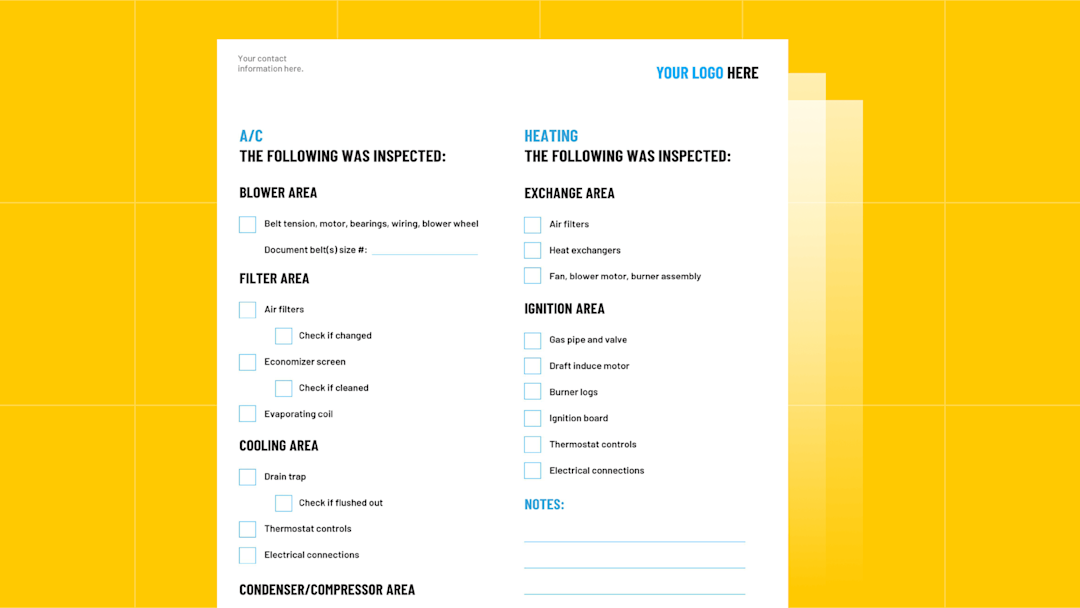

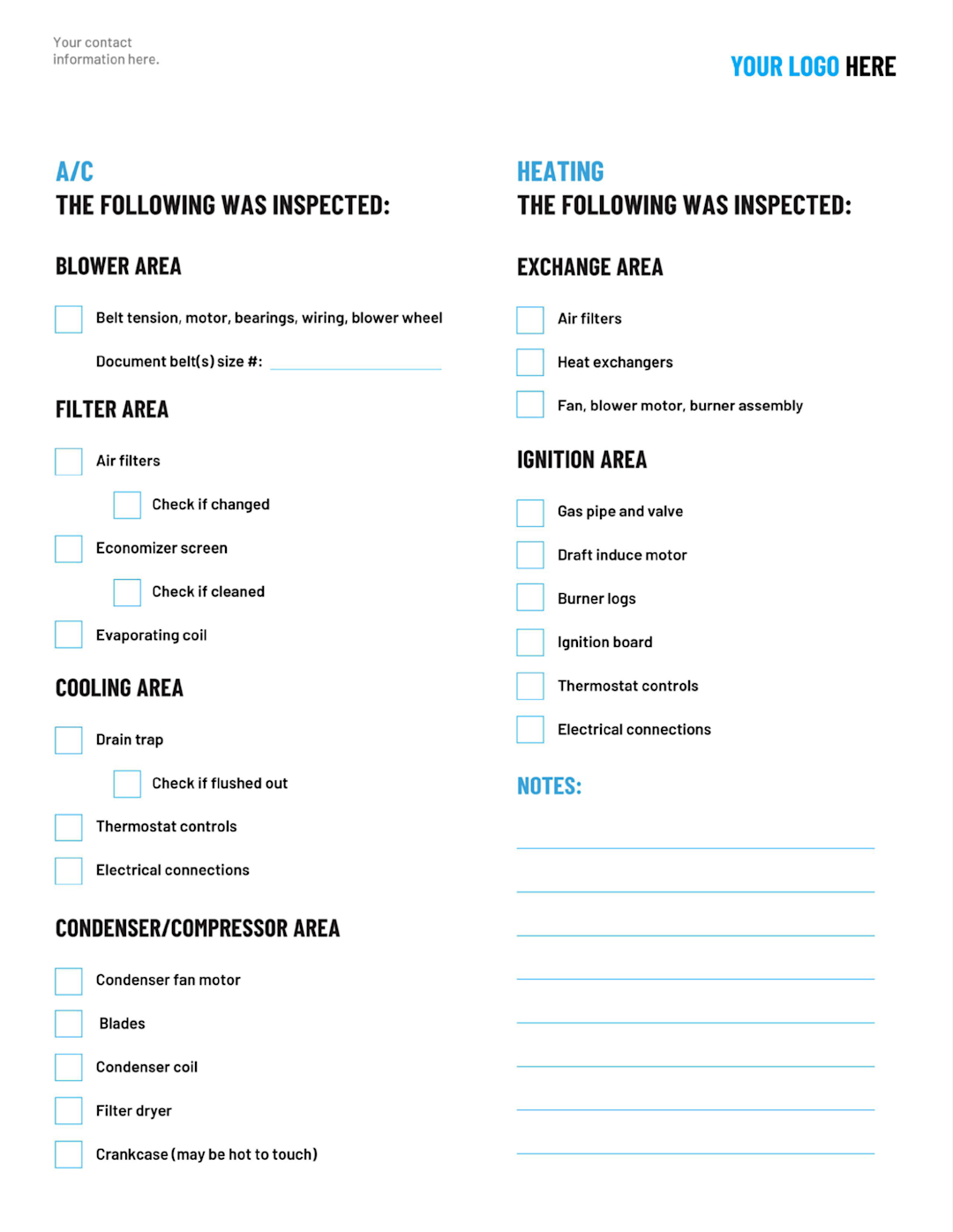
To help guide technicians through the process of maintaining HVAC systems, we’re offering a free HVAC maintenance checklist template.
To get your free template, simply fill out the form above (on mobile devices) or to the right (on desktop), and we’ll email it to you right away.
What’s Included in the HVAC Maintenance Checklist
Our PDF template covers all the essentials, organized into clear, easy-to-navigate sections:
1. Maintenance Details
Date
Voltage, phase, and location of unit
Type of refrigerant
Serial/model number of unit
2. Safety
The disconnect switch is off
Area around the unit is cleared of any debris or hazards
3. Air Conditioning System (AC Unit)
Blower Area: Belt tension, motor, bearings, wiring, blower wheel, belt size
Filter Area: Air filters, economizer screen, evaporating coil
Cooling Area: Drain trap, thermostat controls, and electrical connections
Condenser/Compressor Area: Condenser fan motor, blades, condenser coil, filter dryer, crankcase
4. Heating System
Exchange Area: Air filters, heat exchangers, fan, blower motor, burner assembly
Ignition Area: Gas pipe and valve, draft inducer motor, burner logs, ignition board, thermostat controls, and electrical connections
5. Notes
Space for notes, findings, follow-up actions, etc.
Note: Visit our HVAC templates hub to access related templates, such as our HVAC installation template, commercial hvac maintenance checklist, and spring tune-up checklist.
How Often HVAC Maintenance Should Be Done
Most HVAC systems should be serviced at least twice a year, once in spring before the cooling season and once in fall before heating season. Systems that run hard or sit in extreme climates often need quarterly attention. The point of a maintenance schedule is to catch wear before it turns into a failure, and to do it while the equipment is idle rather than during the first heat wave or cold snap of the year.
Heating and cooling stress different parts of the system, which is why the two visits look different. A spring visit focuses on the air conditioning side before it runs for months straight during the summer. A fall visit focuses on the furnace or heat pump before the first hard freeze. Each system gets checked while it's easy to work on, not after it's already failed on the worst possible day.
Spring: Prep the Cooling System
A spring tune-up gets the air conditioner system ready for summer. Techs clean the condenser and evaporator coils, check the fan blades and refrigerant levels, and test the capacitor and contactor. They also lubricate moving parts like motor bearings, clear any blockages in the condensate drain, and confirm the outdoor unit is holding a proper temperature split.
Fall: Prep the Heating System
A fall tune-up gets the heating system ready for winter, whether it runs on gas or electric heating elements. Techs inspect the heat exchanger, test the ignition, flame sensor, and safety controls, check gas pressure, and watch for gas leaks. This visit is about safety as much as uptime. A cracked heat exchanger or a failing flame sensor is a carbon monoxide risk, not just a comfort problem, and it's far better found in October than in January.
What a Maintenance Visit Delivers
A thorough visit does more than tick boxes. It keeps the system running at optimum energy efficiency, which the customer sees in lower energy costs, and it protects the equipment's lifespan. It also catches small problems, a worn belt, a corroded contactor, a drain starting to clog, before they turn into emergency calls. For the contractor, that early catch is where a lot of replacement work and membership renewals start. The tech who spots a failing part during a tune-up is the one who books the follow-up.
Why PDFs Fall Short in HVAC Maintenance
Filling out this maintenance checklist can help ensure techs don’t miss key steps when inspecting heating and air conditioning units. However, even fillable PDF templates that can be filled out digitally on site have significant limitations.
Specifically:
No Multimedia Support
PDFs are limited to text, meaning technicians can’t attach key photos or videos directly in the form. Instead, they must store media separately, increasing the chances of losing critical evidence or failing to communicate the full scope of an issue.
Time-Consuming & Error-Prone Workflows
PDFs don’t sync with your CRM, project management software, or other apps. The tech’s recommendations must be manually transferred to the office, slowing down estimates, follow-ups, and approvals.
Fragmented Communication
With details spread across PDFs, emails, and texts, nothing moves in real time. If a tech flags a weak flame sensor but no one follows up promptly, it turns into a breakdown, and a lost customer.
No Real-Time Updates or Accountability
A PDF checklist can’t confirm whether the tech tested all key components, like static pressure or system temperature split. If a key maintenance task is skipped or missed, there’s no automatic way to catch it before closing the job.
Why Settle for Outdated PDFs? ServiceTitan Eliminates These Pain Points.
A checklist keeps techs consistent and covers the basics. What it can't do is connect that work to what comes next, such as the estimate, the follow-up, the renewal, or the invoice, so a tech's findings get re-entered by hand or chased down later.
In the next section, we’ll show you how ServiceTitan’s HVAC service software handles the workflow around the checklist, so findings turn into booked work instead of notes that get lost.
The #1 newsletter for the trades.
How ServiceTitan Manages the Whole HVAC Maintenance Workflow
With ServiceTitan, a digital checklist is one piece of a connected workflow. From a single job, contractors can:
Require the checklist before a tech can close out the job
Capture photos and video of findings right in the form
Get AI help in the field to troubleshoot issues and answer equipment questions on the spot
Turn a flagged issue into a Good-Better-Best estimate on the tablet
Keep every maintenance agreement in one place, easy to find and update
Schedule recurring maintenance visits automatically
Invoice and collect payment faster, straight from the job
Ensure the Proper Forms and Checklists Are Completed for Every Job

ServiceTitan empowers contractors to create fully customized forms including HVAC preventative maintenance checklists.
Key Features of Custom Forms
Flexible Customization: Easily build forms from scratch or use pre-built templates sourced from TitanExchange, where you can access tried-and-tested forms used by other HVAC businesses. Tailor them to suit your needs and preferences.
Multi-Format Options: Add a variety of inputs to your forms, including:
Text fields
Number fields
Checkboxes
Photo/video uploads
Dropdown menus
Stoplight buttons
Digital signatures for sign-offs
Job-Specific Integration: Attach forms directly to specific jobs, customers, locations, or HVAC equipment.
Ensure Checklists Are Used Every Time
In form settings, business owners can select the option to require techs to fill out certain forms for certain jobs.
For example, if a tech is performing a preventative maintenance check-up, they can be required to complete your HVAC maintenance checklist before they’re able to mark the job as complete.
Or, if they’re installing a new HVAC system, they can be required to complete an HVAC installation checklist and warranty form before closing out the job.

This fosters accountability through automation, reducing stress on behalf of owners and managers while ensuring standard operating procedures are followed in the field for every job.
Customize and Adjust Checklists with Ease


Users can also add or subtract from maintenance checklists to perfectly match their needs and preferences. For example, any of the following could be added to checklists to ensure that HVAC technicians make thorough assessments:
Heat pumps
Gas furnace
Gas pressure
Indoor air quality
Refrigerant levels
Proper airflow
Humidity levels
Condensate drains
Ductwork
Drain pans
Drain lines
Flue system
Pulleys
Evaporator coils
Carbon monoxide detectors
In addition, every form and checklist can be duplicated as many times as necessary to address all of the HVAC units present, right from the job site.
Get Trade-Specific AI Assistance in the Field

ServiceTitan's mobile app also includes Atlas, our AI field assistant built directly into the platform. Rather than a separate chatbot bolted onto the software, Atlas works with the same job, customer, and equipment data techs already see on the job.
When a maintenance check turns up a problem, techs can ask Atlas real-time questions and get answers pulled directly from ServiceTitan's own data, without stopping to call the office. With ServiceTitan's add-on Field Pro product, Atlas can also pull details straight from equipment manuals, spec sheets, and installation guides, so techs aren't stuck flipping through paperwork or waiting on hold with manufacturer support. Techs can also ask Atlas to help troubleshoot and diagnose a problem, including built-in diagnostic tests and calculators, right from the app.

This closes the two most common ways a job stalls in the field: waiting on someone else for an answer, or guessing.
Create and Present Estimates When Issues Are Discovered

For business owners, one of the benefits of having a consistent HVAC inspection process is that it empowers field technicians to discover and capitalize on valuable sales opportunities.
For example, when a tech finds an issue with HVAC equipment during regular maintenance, ServiceTitan gives them the ability to build a custom Good Better Best proposal right from our integrated pricebook.

Using a tablet, techs can present proposals, including product photos, equipment specs, and pricing, to homeowners on the spot, as well as email them to customers for review and approval. This feature allows contractors to save time on delivering estimates to customers whose needs are often urgent.
ServiceTitan also provides automated tracking and follow-up on outstanding estimates, enabling users to improve close rates and maximize their bottom line.
Easily Track, Access, and Update Maintenance Agreements

Oftentimes, HVAC maintenance checklists are used in the context of HVAC memberships or maintenance agreements. ServiceTitan's membership feature gives HVAC businesses the ability to effectively and efficiently document, manage, and track recurring services associated with maintenance agreements.
Crucially, all of the records and specifications of HVAC memberships are stored in one place, making them easy to search and reference with just a few clicks.
Details that ServiceTitan users store with this feature include:
Membership type
Agreement period
Membership locations (single or multiple)
Billing schedule and price
Service frequency (e.g., quarterly, biannual, or annual maintenance plan, etc.)
Revenue recognition (point of sale or deferred)
Since this information is archived in a central location, contractors have no need to sift through paper files or spreadsheets to find exactly what they’re looking for. The details are easy to edit and can be viewed from our desktop app by office staff or by technicians in the field.
Membership tracking is also seamlessly integrated with the software tools that our users rely on to do things like schedule jobs, build proposals, send invoices, and collect payment.
Schedule Preventative Maintenance Visits Automatically

Once recurring service events are set up, they are automatically added to your schedule based on the defined dates and frequency. This saves office staff significant time from having to manually track and add these jobs to the schedule while reducing the chances of missing maintenance visits.
Office staff can view upcoming recurring service events by date range and initiate individual jobs by contacting the customer to coordinate a time and book the job. At that point, the job will be assigned to a technician and be automatically viewable on their schedule and through the dispatch board.
You can also create follow-up notifications for cases where you’re unable to contact a customer, they aren’t ready to book a job, or they no longer want the service. These offer HVAC contractors peace of mind and help to ensure that office staff doesn’t forget to follow up in these instances.
If you’re scheduling a maintenance visit that’s not connected to a service agreement, our call booking workflow offers a suite of features that make this seamless, including:
Providing CSRs with the names and customer histories of incoming callers.
Guiding CSRs through an intuitive set of form fields and drop-down menus to ensure all essential details are captured on the first call.
Allowing CSRs to efficiently schedule appointments from the same screen.
Automatically adding scheduled jobs and job details to our sophisticated yet easy-to-use dispatch board.
Efficiently Send Invoices and Get Paid Faster
Drawing on the equipment, hourly rates, and other factors that go into an HVAC quote, ServiceTitan automatically populates invoices so there’s no discrepancy between the estimate and the bill.

HVAC contractors can choose to send invoices by email — with a link to allow clients to pay online — or have them e-signed on site with a mobile device.
Collecting payments is similarly painless. Homeowners and commercial clients can pay through our customer portal, which allows them to save credit card information. Contractors are still free to take cash or check, too. (As revenue flows in, our QuickBooks integration makes it easy to track.)
Finally, ServiceTitan can help HVAC contractors overcome objections by providing near-instantaneous access to customer financing from one of our financing partners. It takes just minutes on our mobile software for customers to apply and get approved, reducing cost obstacles that might otherwise reduce profitability.
Get a ServiceTitan Demo to See How We Can Help You Optimize and Grow Your HVAC Business
While PDF HVAC maintenance checklists are better than having no checklist at all, they simply can’t solve many of the business process challenges inherent in the surrounding workflows of executing HVAC work.
Using a purpose-built HVAC platform like ServiceTitan gives contractors the ability to build customizable forms and checklists that connect directly to the rest of their operation, from estimates to scheduling to invoicing, so a tech's findings drive real work instead of sitting in a static file.
In addition to simply optimizing the inspection process for heating and cooling systems, our software offers additional features to facilitate other core business functions as well, including:
See how ServiceTitan’s HVAC software can give you the tools to run a tighter operation and grow your business. Schedule a call for a free product tour.