![Home Depot Pro Xtra: What It Is and How to Use It [+Benefits]](https://images.ctfassets.net/3q1a0w8cwuwf/2fo3ipRXX1CoeMcDO05xzl/1e98716764d8fafe36440bc949a0b9c6/Home_Depot_Pro_Xtra__What_It_Is_and_How_to_Use_It_-_Benefits-.png?w=1920&h=1182&fm=webp&q=85&bg=transparent)
Most contractors shop at Home Depot regularly. Yet, far fewer use the Pro Xtra package well enough to maximize the value of the money they already spend there.
Without a Pro Xtra account, you miss out on rewards, member-only discounts, volume pricing, and digital purchase tracking. And for businesses managing multiple crews and jobs every week, those missed savings can add up quickly.
That’s why it’s important to understand how Home Depot Pro Xtra works. When used correctly, this loyalty program can help contractors reduce material costs, organize purchasing, and get more value for daily supply runs.
This article explains how Home Depot Pro Xtra works, its benefits for members, and how contractors can maximize the platform’s features. We’ll also cover how ServiceTitan helps contractors get more value from Pro Xtra by connecting Home Depot purchases to tools that keep material spending organized, measurable, and profitable.
» Want to grow your business? Click here to get a demo.
What Is Home Depot Pro Xtra?
Home Depot Pro Xtra is a free loyalty and rewards program designed for contractors, tradespeople, and other professionals who shop on the Home Depot platform.
The program rewards contractors for consistent, high-volume purchasing by giving them exclusive offers, rewards, gift cards, purchase-tracking tools, and business-focused account features.
Members can earn rewards on qualifying purchases, unlock bulk and volume pricing, track spending by project, store receipts digitally, and simplify purchasing management across multiple jobs and crews.
The #1 newsletter for the trades.
Who qualifies for Pro Xtra?
The Pro Xtra loyalty program is open to any professional who regularly purchases materials or supplies for their work. The program is most valuable for:
HVAC technicians purchasing refrigerants, filters, and equipment
Plumbers buying pipe, fittings, fixtures, and water heaters
Electricians sourcing wire, panels, outlets, and conduit
Painters ordering paints, primers, stains, and application tools
Remodelers and general contractors running multi-trade projects
Property managers overseeing ongoing maintenance and repairs
Maintenance crews handling commercial or residential upkeep
You don’t need a contractor’s license to join. If you’re buying materials for professional use, the program is designed for you.
Membership tiers: Member, Elite, and VIP
Pro Xtra has three spending-based tiers. Every dollar spent moves members up a level, and once a tier is reached, it’s maintained for the current and following year.
Member (baseline): Entry-level access. Available to all who sign up. Includes Pro Xtra bonus perks, personalized offers, paint rewards, access to business tools, and exclusive savings and events.
Elite: This unlocks after you’ve spent $25,000+ in annual qualifying spend. Elite covers everything in the Member package, plus the Elite Support Line (which is prioritized access to Home Depot support via live chat, text, and phone), and preferred pricing.
VIP: VIP starts at $250,000+ in annual spend. This includes everything in Elite, plus a dedicated account manager and other VIP experiences.
What Are the Benefits and Perks of Using Home Depot Pro Xtra?
Home Depot Pro Xtra doesn’t just give contractors simple rewards points. The program is designed to actually reduce material costs, simplify purchasing, and reward contractors for the money they already spend at Home Depot.
The more consistently a contractor uses the account, the more value the program delivers. Some benefits apply immediately after signup, while others improve as annual spending increases and higher membership tiers are unlocked.
Pro Xtra Perks (rewards points)
Every qualifying purchase made with a Pro Xtra account earns Pro Xtra Perks, which function like a contractor-focused rewards currency.
As contractors accumulate perks, they can redeem them toward future Home Depot purchases or apply them to tool and equipment rental fees on eligible rentals.
For example, if a plumbing contractor regularly buys pipe, fittings, fasteners, and water heaters from Home Depot, those purchases gradually generate perks that can later offset the cost of additional materials or rental equipment.
Exclusive discounts
One of the biggest reasons contractors use Home Depot Pro Xtra is access to discounts that are not available to regular retail shoppers.
Instead of offering the same generic coupon to everyone, Home Depot tailors many Pro Xtra discounts around a contractor’s actual purchasing habits. The system tracks the types of materials and products a business buys most often and then generates offers related to those categories.
For example, a commercial electrical contractor who regularly purchases conduit, wire, breakers, and electrical boxes may start receiving discounts on those same products. A painting contractor may instead receive offers for paints, primers, rollers, tape, and surface-prep materials.
This makes the offers more valuable since they apply to products contractors already buy repeatedly for jobs.
Track your purchases online
Contractors often forget which materials they purchased for a specific project, especially after weeks or months, making it harder to track purchases on large or multi-day projects.
Luckily, with the purchase tracking option that’s included in the Home Depot rewards program, you can access your purchase history by job, purchase order, location, or date.
Purchase tracking can also be very helpful come tax season. You can export purchases to spreadsheets or accounting software, such as QuickBooks, so you can accurately calculate your taxes, maximize potential benefits, and avoid defaulting on your payments.
Credit card account management
Managing purchases with your Home Depot rewards credit card is easy from within the Pro Xtra Workbench.
Home Depot credit card benefits extend beyond just the ease of tracking from the Workbench, though. You can link your Home Depot Pro Xtra card to your debit or credit card, checking account, or THD keytags.
Reloadable Home Depot credit cards that have set spending limits can also be managed through the Workbench. This allows you to issue cards to employees while still monitoring the amount they can spend in a single visit.
You can even link reloadable cards to the Home Depot Pro app to view detailed receipts of employee purchases.
Order approvals with Text2Confirm
Keeping track of what your technicians purchase in the field is one of those things that can quietly drain your budget if there’s no oversight.
Text2Confirm solves that by sending purchase details straight to your phone the moment a staff member is ready to buy, giving you the chance to review and approve the order in real time before any money is spent.
You can see exactly what’s being purchased, confirm it’s the right material for the job, and approve it. If the order is ready to go, you can also complete the payment directly from your phone on the spot.
Volume pricing program (VPP)
Material costs are one of the biggest variables in any contractor’s budget, and the more jobs you run, the more those costs add up. The Volume Pricing Program is designed to help contractors reduce those costs by unlocking better pricing for large material orders.
When you’re purchasing significant quantities of eligible materials, you don’t have to settle for standard retail pricing. Instead, you can take the order to the Home Depot Pro Desk and submit a VPP request, which triggers a review for contractor-level pricing based on the volume you’re buying. The more you’re ordering, the stronger the case for a better rate.
For contractors running multiple jobs at once or stocking up ahead of a busy season, this can translate into meaningful savings that go straight back into the business.
What Business Tools Do You Get With Pro Xtra?
Beyond discounts and rewards, Home Depot’s loyalty program includes a suite of business management tools to help contractors track spending, manage teams, and streamline procurement.
Below are a few examples of such tools:
Online purchase tracking tools
You can pull up your purchase history filtered by job, purchase order, location, or date, making it easy to see exactly what was spent and where. When it’s time to reconcile your books or prepare for tax season, you can export that data directly to a spreadsheet or accounting software like QuickBooks, so your records are already organized when you need them.
Pro Xtra Quote Center
The Quote Center lets members request pricing on bulk orders, special orders, and full project material lists. Instead of pricing out large purchases item by item, contractors can submit a project scope and receive a consolidated quote. This is useful for bidding jobs accurately before committing to materials.
Purchase tracking & receipt management
Pro Xtra keeps up to two years of purchase history in one place. You can log transactions, organize them by job name, and export records directly to accounting software. This makes job reconciliation and tax documentation significantly easier than chasing paper receipts.
How to Sign Up With Home Depot Pro Xtra
Setting up a Home Depot rewards account is fast and easy online. You simply need to follow these instructions:
Download The Home Depot App and log in
Navigate to the Pro Xtra section and click on the icon to sign up
Fill in the requirements and submit through the website
Visit the Home Depot website (homedepot.com)
Navigate to the Join Pro Xtra section
Submit the required information and choose your trade
Click on the “register for Pro Xtra” option.
You can also register in person at the Pro Desk at any Home Depot store or call Home Depot customer service to set up an account by phone.
How to Get the Most Out of Pro Xtra
Signing up for Pro Xtra is just a piece of the puzzle. You need to understand how the platform works to make the most of its perks.
Here are some practices that can make a major difference in the value you get from the program:
Always scan your Virtual ID at checkout: This applies to both bulk and small purchases. Every purchase builds your purchase history, contributes to tier thresholds, and keeps your account active. Skipping a scan on a $20 purchase might seem harmless, but across 100 store visits a year, those overlooked purchases can add up to a meaningful number of reward points lost.
Consolidate job-related purchases to hit tier thresholds faster: If your team is split across multiple job sites and buying materials independently, those purchases may not all be tied to your Pro Xtra account. Centralizing purchasing — or even adding employees as authorized users — ensures that every dollar counts toward your annual spend total.
Use the Pro Desk for large or recurring orders: For bulk materials or recurring items, working with a Pro Desk associate lets you request VPP quotes and negotiate project-specific pricing.
Set employee spend limits with Pro Allowance: If crew members are making material runs independently, set pre-approved limits per employee and use Text2Confirm for purchases. This prevents overruns and keeps your job-level material budgets intact.
Check the Rewards Hub regularly: Personalized in-store offers rotate and expire, so checking the app before store visits ensures you don’t miss out on available discounts.
Link a Home Depot Pro Xtra credit card to your account: Doing this increases your perks and accelerates how quickly you can redeem rewards for merchandise or equipment rentals.
How ServiceTitan Helps You Maximize Pro Xtra
Home Depot Pro Xtra helps contractors reduce material costs, but saving money at checkout is only part of the equation. Most contractors want to know whether those savings are actually improving job profitability, ensure the materials and tools they purchase are stored safely, and always easily find what they need for each job.
That’s why field businesses need to subscribe to tools like ServiceTitan.
ServiceTitan is a service management software built specifically for trade businesses. The platform helps contractors move beyond simply earning rewards on Home Depot to actually managing material spending more strategically.
Instead of purchases becoming disconnected receipts or untracked expenses, ServiceTitan connects material purchases directly to the jobs they support. The platform gives contractors a clearer view of material costs, profitability, and purchasing activity across the business.
Below is a breakdown of how ServiceTitan can help improve Pro Xtra performance:
Job costing: see exactly where every dollar goes
Most contractors have a general sense of their material costs, but ServiceTitan makes it more accurate.
Job costing works by tying every material purchase to a specific job record. When a technician picks up PVC fittings at Home Depot for a water heater replacement, that purchase isn’t just recorded as a general expense; it’s logged against that specific job, reducing the available material budget in real time.

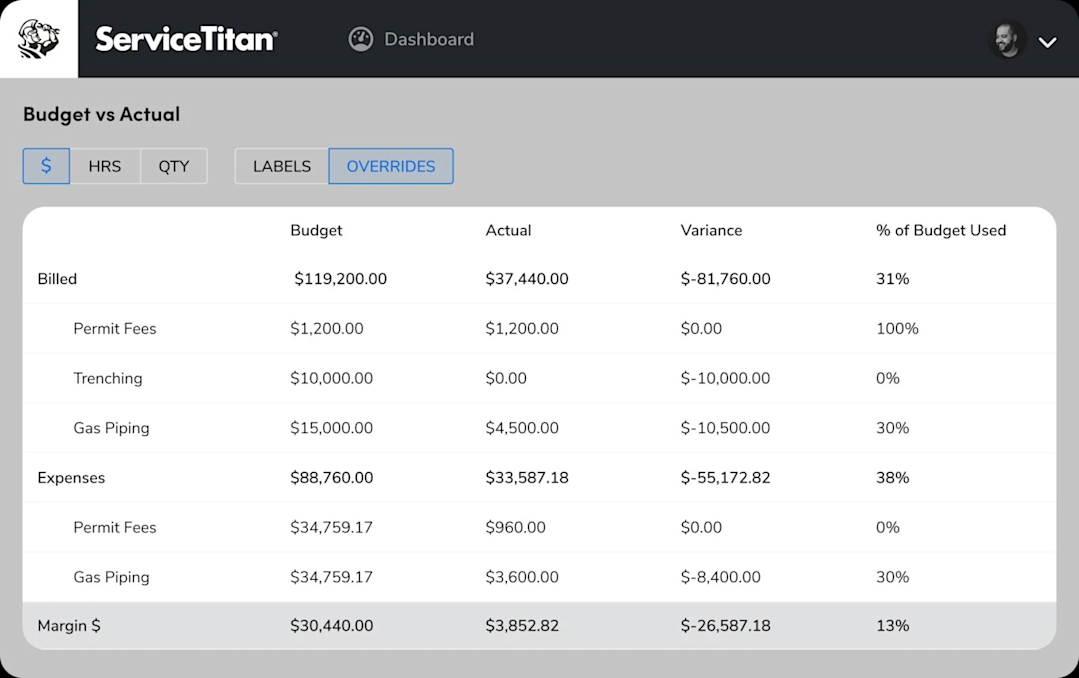
Here’s what that looks like in practice: you quote a bathroom remodel at $1,200 in materials. Midway through the job, ServiceTitan shows $940 already spent. Your technician is heading back to Home Depot for additional supplies. Before they buy anything, they can see exactly how much budget remains, and you can see it too, from the office.

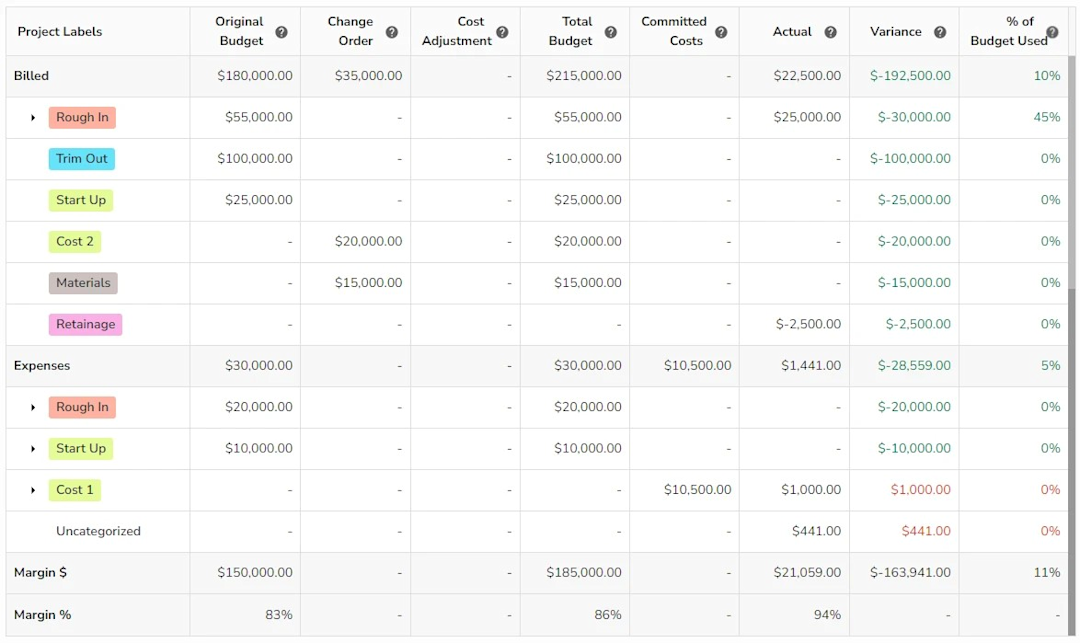
If the job closes at $1,470 in materials instead of $1,250, ServiceTitan flags that $220 overage and ties it to that job.
Subsequently, as you spend on materials, ServiceTitan monitors patterns on the backend. For example, you may discover that bathroom remodel estimates consistently run 15-20% over on materials, which means you either adjust your pricing, negotiate a bulk-purchase deal with a Pro Desk associate, or switch to another retailer.
Purchase orders: stop ad hoc purchasing before it starts
Unplanned store runs are one of the most common sources of delays in contracting businesses. A technician needs a part, heads to Home Depot, grabs what they came for plus a few extras, and therefore wastes 30 minutes they can never get back. Over time, those 30 minutes add up to days of delays, resulting in missed timelines.
ServiceTitan’s purchase order system addresses this before the technician leaves for the store.
When a job is scheduled, the supervisor or manager can see all required tools and materials and confirm whether they are available. If an item is out of stock before a job, the technician will see it in the inventory overview before leaving the office.
In either case, if there’s a shortage identified, technicians or supervisors can create a purchase order ahead of time in ServiceTitan that lists the specific materials needed, quantities, and estimated cost. That PO is tied to the job and helps them buy in bulk.

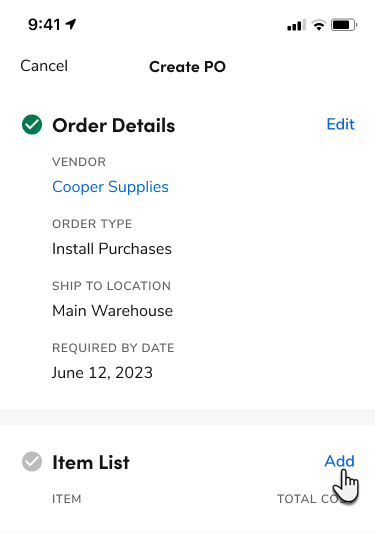
When the technician checks out at Home Depot, they’re buying against a documented list, not shopping freehand. When the purchase comes back and is reconciled against the PO, ServiceTitan automatically flags any variance. This could be an item that wasn’t on the list, a quantity that exceeded the approved amount, or a price that came in higher than estimated.
Inventory management: buy what you need, not what you think you need
A significant amount of unnecessary Home Depot spending results from poor inventory management. A technician assumes the van is out of a specific fitting, makes a store run, and later finds a box of the same fitting sitting in the warehouse. That’s a wasted trip and a waste of the budget.
ServiceTitan’s inventory management tools track materials across every truck, warehouse shelf, and job site in real time. When a technician pulls a part from their vehicle stock, it’s logged against the job and deducted from the truck’s inventory.

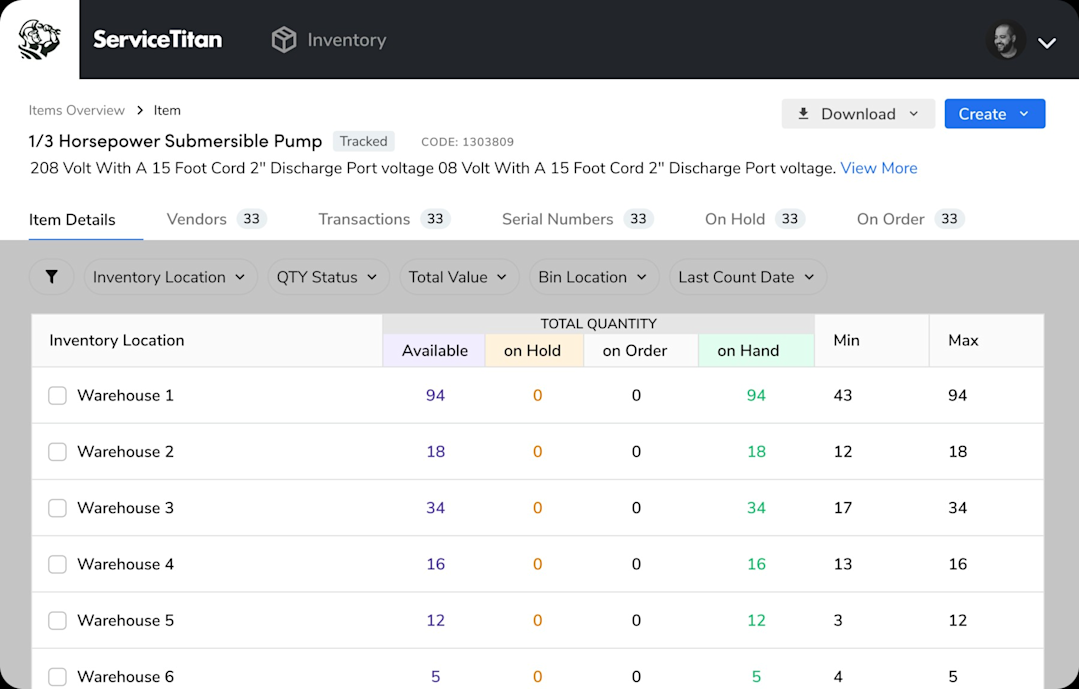
When stock falls below the minimum threshold set in the van’s inventory template, the system flags it for replenishment. Technicians can select the warehouse as the replenishment source and order the new material. But if the stock is also depleted in the warehouse, the manager creates a purchase order in the app, sends it to the vendor, and receives it upon arrival, all within ServiceTitan.
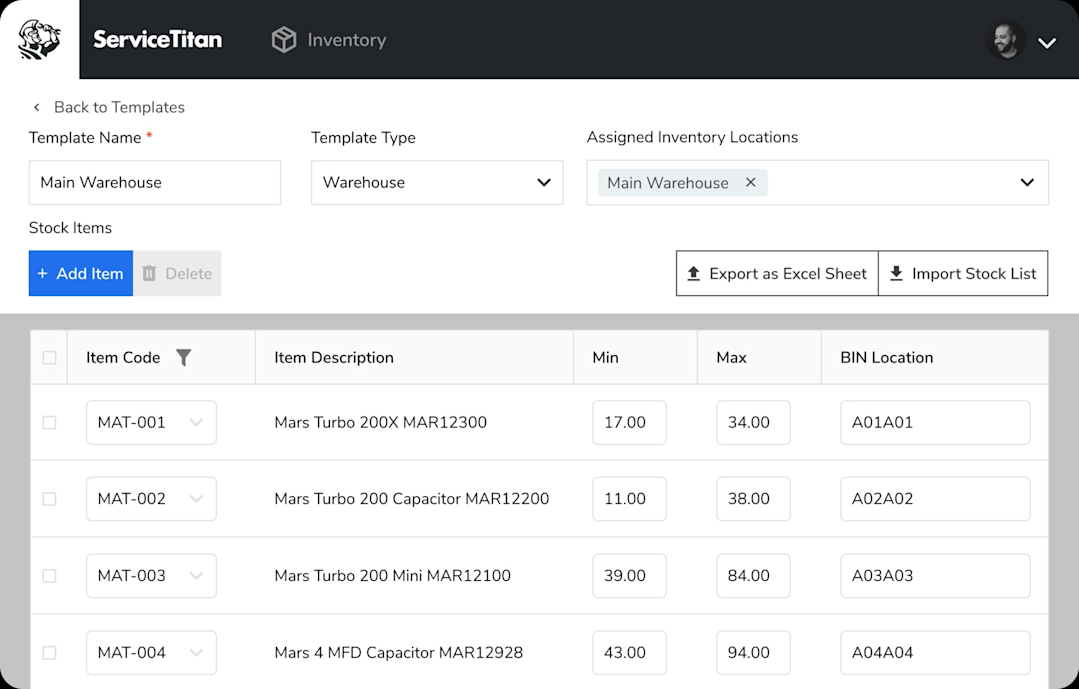
For Pro Xtra members, this changes how you approach purchasing. Instead of sending technicians to Home Depot whenever something runs low, you can plan replenishment purchases and consolidate orders. That way, you can time purchases around Pro Xtra offers and buy in quantities that help you hit Elite or VIP tier thresholds.
Reporting: confirm the savings are real
Pro Xtra shows what you saved at the point of purchase. ServiceTitan shows you whether those savings held up by the time the job was complete.
ServiceTitan’s reporting tools pull material spend data across every job, organized by job type, technician, time period, or location. It then compares the amount budgeted against the actual amount spent, and calculates the variance and percentage of the total budget each item consumes.
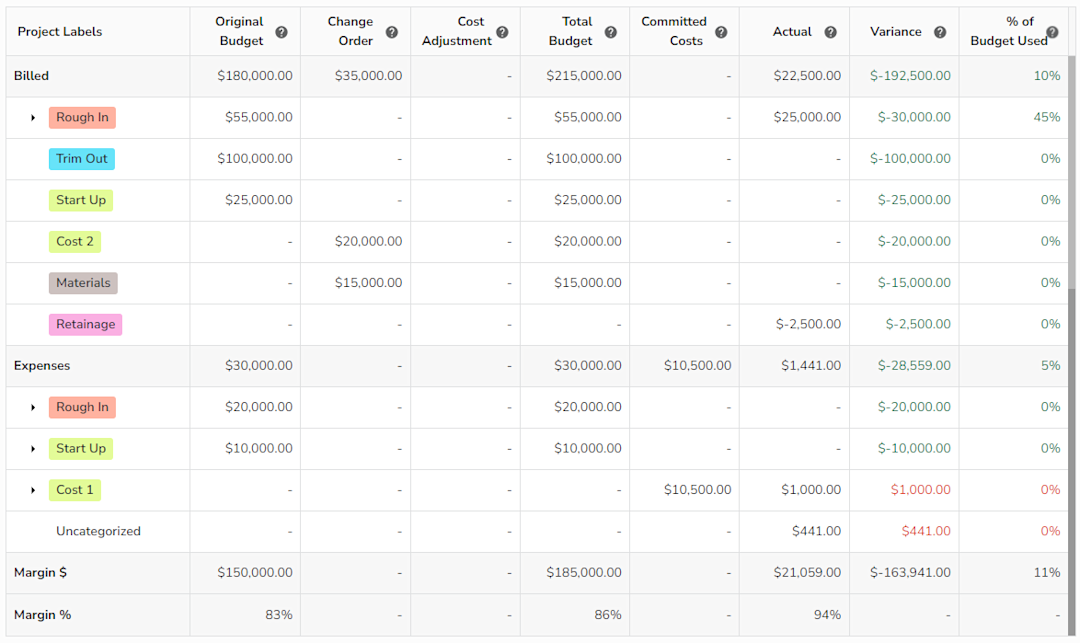
This lets you answer specific questions:
Are my HVAC jobs consistently over on materials?
Is one technician’s spending significantly higher than others on similar jobs?
Did the preferred pricing discount I earned actually improve the margin on that project, or did something else eat into it?
For businesses approaching the Elite or VIP tier thresholds, ServiceTitan’s reporting also provides a real-time view of year-to-date material spend across all jobs. That way, you can plan purchases to hit reward limits in Pro Xtra, instead of discovering that you missed it when reviewing your Pro Xtra statement.
Mobile app: put the right information in the field
ServiceTitan’s mobile app gives technicians access to their assigned jobs, open purchase orders, and current inventory levels from their phone.

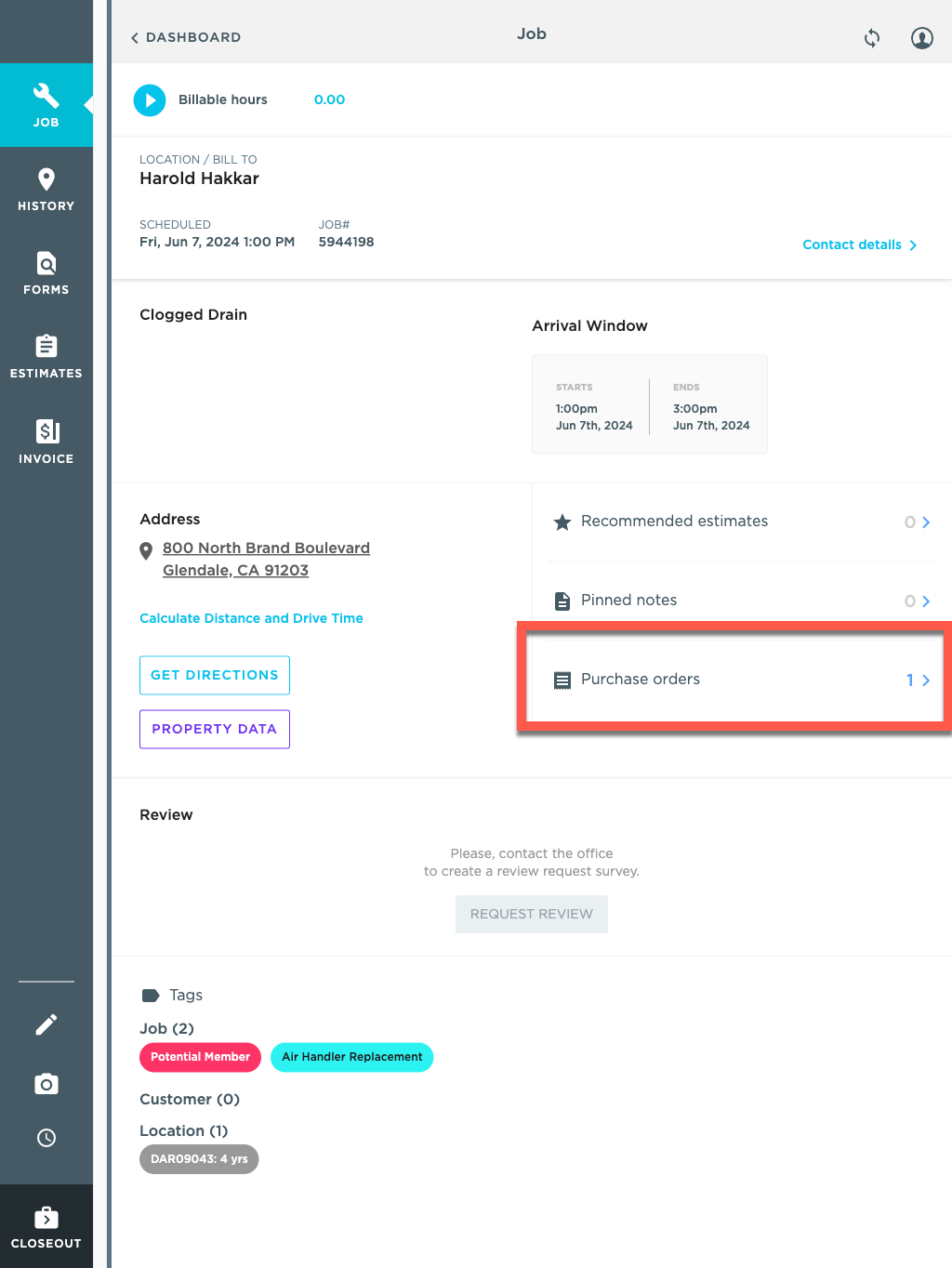
Before walking into Home Depot, a technician can check the PO for that job, confirm exactly what’s needed and in what quantity, review the remaining material budget, and verify whether any of those items are already in truck stock.
At checkout, they scan their Pro Xtra Virtual ID to apply rewards and preferred pricing. When they return to the job, the purchase is reconciled against the PO in ServiceTitan, logged to the job’s cost record, and reflected in inventory.
That way, Pro Xtra handles the savings at the point of purchase, and ServiceTitan ensures those purchases are tracked, reconciled, and connected to the jobs they belong to. This means nothing gets lost between the checkout counter and the final invoice.
Over to you
Home Depot Pro Xtra is one of the simplest ways for contractors to reduce material costs. From paint discounts and volume pricing to digital purchase tracking and rewards, Pro Xtra delivers real value for contractors who use it consistently.
But the contractors who benefit the most are the ones who go beyond earning rewards and start tracking how purchasing affects profitability.
ServiceTitan allows contractors to connect material purchases directly to specific jobs, compare actual material costs against estimates, and gain better visibility into margins across the business.
If you want tighter control over purchasing, clearer job costing, and better insight into profitability, you can check out the ServiceTitan platform.
Contact us to learn more about how it works.
ServiceTitan is a comprehensive software solution designed to help service companies streamline operations, boost revenue, and substantially elevate their business trajectory. Our comprehensive, cloud-based platform is used by thousands of electrical, HVAC, plumbing, garage door, and chimney sweep shops across the country, and has increased their revenue by an average of 25% in just their first year with us.


ServiceTitan Software
ServiceTitan is a comprehensive software solution built specifically to help service companies streamline their operations, boost revenue, and substantially elevate the trajectory of their business. Our comprehensive, cloud-based platform is used by thousands of electrical, HVAC, plumbing, garage door, and chimney sweep shops across the country—and has increased their revenue by an average of 25% in just their first year with us.