





If you’re looking to invest in a construction project management app, there are two main types of solutions available:
General Project Management Apps: These are project management software built for a wide range of industries from marketing to human resources to IT. Common features include task management, Gantt charts, document management, and more.
Construction Project Management Apps: These are project management platforms built specifically for the construction industry. In addition to features such as task and document management, these solutions offer tools for estimating, project scheduling, time tracking, customer relationship management (CRM), job costing, and more.
Compared to construction-specific project management platforms, general project management tools have some distinct disadvantages. Specifically:
Limited Functionality: General project management apps offer flexible systems for task management and team member coordination, but lack essential tools for construction project management (job costing, construction scheduling, timesheets, etc.).
Lack of Construction-Specific Workflows: Because general project management apps aren’t built specifically for construction businesses, they tend to lack key workflows for estimating, progress billing, inventory and purchase order management, and more.
As a result, most contractors will find greater value in project management systems that are built specifically for construction. That’s what we’ll focus on in this article.
We’ll explain how our platform, ServiceTitan, helps trade contractors streamline construction project management. Then, we’ll share 6 other construction project management apps to consider.
Best Construction Project Management Software
Schedule a call to get a free, live, one-on-one walk-through of how ServiceTitan helps contractors streamline project management and other processes.
1. ServiceTitan
ServiceTitan specializes in supporting subcontractors in Mechanical/HVAC, plumbing, electrical, and various other trades. To demonstrate how our platform can assist specialty contractors in facilitating project management, we’ll walk through some of our construction management features, including:
Project dashboard
Estimates
Purchase orders
Job costing
Progress billing
Accounting
Crew scheduling
Mobile app
Manage Projects From the Project Overview Dashboard

When a new project is created in ServiceTitan, a project overview page is automatically generated. From this dashboard, contractors and project managers can:
View high-level project information (project description, contract dates and timelines, job site details, etc.).
View open tasks, and log and assign new tasks.
Initiate key project actions such as generating estimates, purchase orders, applications for payment, invoices, and more.
In addition, users can access detailed project financials (discussed below), and a project audit trail including events, notes, and files relevant to the job (RFIs, submittals, etc.).
Build Estimates with Accurate Pricing

Project estimates allow you to build detailed construction estimates by adding all of the specific tasks, equipment, and materials that will be needed to do the work. Users have the option to draw from pre-built job estimate templates or build estimates from scratch.
Tasks, materials, and equipment can all be tagged with color-coded project labels to organize the project details and make everything easy to visualize. In addition, pricing and markups for each line item are automatically calculated based on the most up-to-date prices in your pricebook.
Once an estimate is complete, it can be printed, emailed, or exported in PDF format and sent to the client. Additional estimates can be created as needed throughout the project.
Initiate Requisition and Purchase Orders
When an estimate is sold, all of the details you’ve set up in the estimate are automatically integrated into the rest of the project management workflow. For example, you can initiate a requisition of equipment and materials right from within your sold estimate.

For example, let’s say at the beginning of a project, you want to start the process of ordering your permits and materials for the job — you can select those items right from your estimate, which will lead you through a workflow to create the purchase orders you’ll need.
In the purchase order workflow, the line items are automatically populated from your estimate. You can simply select your vendors and shipping locations for each material to complete your order details.
Then, you can save that order to create a transaction and send those purchase orders to your vendors — without ever leaving ServiceTitan.
The #1 newsletter for the trades.
Automate Project Financials and Job Costing
As you progress through a job — creating purchase orders, logging labor hours, processing change orders, receiving progress payments, and so on — ServiceTitan automatically provides up-to-date project financials and job costing.
Instead of constantly needing to update a series of spreadsheets every time labor costs and material costs are incurred, this is done automatically for you in real-time, based on work that’s completed and entered into the system.
If we continue with our example from above, and you’ve made your initial purchase order of permits and materials, your project summary table is updated to reflect those expenses:

Furthermore, you can view a more detailed breakdown of your actual costs versus your budgeted construction costs.
This will automatically update as you accumulate expenses from materials, equipment, and labor hours. It will display your margins in dollar and percent form to help you track job costs and profitability throughout your project.


You can also access a table breaking down your expenses in further detail:

You can click on any line item and see the exact source of where that expense came from (e.g., which technician logged those hours, or which purchase orders and vendors those materials came from). This allows you to easily check your numbers and feel confident in your data sources.
When it comes time to send applications for payment and invoices at each stage of progress billing, this can also be easily accomplished from the project overview dashboard.
Automate Progress Billing and Invoicing
The initial estimate you created also informs and populates your continuation sheet in your application for payment:


No more reinventing the wheel for every asset that needs to be created throughout your project. When sending a payment application, you can easily generate one by selecting the billing period and the percent of each line item you want to bill for.
Then, you can generate a PDF payment application with the details automatically filled out, and send it off to your client for review. The detail of the continuation sheet makes for a bill that’s much easier to defend in the event of pushback from construction companies or general contractors. As a result, subcontractors can get paid faster and avoid cash flow issues.
When applications are accepted, it’s just as easy to generate an invoice for that progress payment. And, when payments come in, you can update your accounts receivable through our Viewpoint, Sage, QuickBooks, and CSV accounting integrations.
Streamline Accounting Workflows


In addition to streamlined billing, we offer numerous accounting features that can also be accomplished in traditional accounting software with similar efficiency, albeit with a more user-friendly interface (and within the same platform as the rest of your business operations).
For example:
Mass Actions: Users can make mass selections and perform actions such as emailing and printing invoices, or charging interest for delayed payments.
Customer Payments: Users can charge credit cards or identify failed charges and follow up with customers to resolve payment issues.
Applied Statuses: Users can track and ensure that all payments received from customers have been applied appropriately to invoices.
These same features for tracking, making mass selections, and taking mass actions are also available on the Accounts Payable side to track and pay your vendor bills.
Crew Scheduling Built for Construction Teams

ServiceTitan’s Crew Scheduling gives subcontractors a centralized, real-time scheduling board that mirrors how construction teams actually operate — no more spreadsheets, whiteboards, or generic PM tools.
Dispatchers can build structured crews with designated leads, assign permanent or floating techs, and instantly see availability through a live, one-week calendar that prevents conflicts and overlaps.
Every schedule update syncs across the system, giving the office and field a shared source of truth for crew assignments, job progress, and technician shifts. When project timelines shift, crews can be rebalanced in seconds without disrupting the rest of the week.
Crew leads manage their teams through ServiceTitan Mobile, creating automatic, time-stamped records that support accurate billing, documentation, and change order verification.
Key benefits include:
Accurate, conflict-free scheduling with real-time visibility.
Better crew utilization through clear availability and flexible staffing.
Faster decision-making with a live weekly schedule view.
Stronger accountability via structured field team leadership and automatic activity logs.
Lower labor costs by reducing overtime, idle time, and miscommunication.
Together, these capabilities help subcontractors move from reactive scheduling to proactive workforce planning — improving efficiency, reducing chaos, and keeping projects on track.
Project Manage From the Job Site with the Field Mobile App

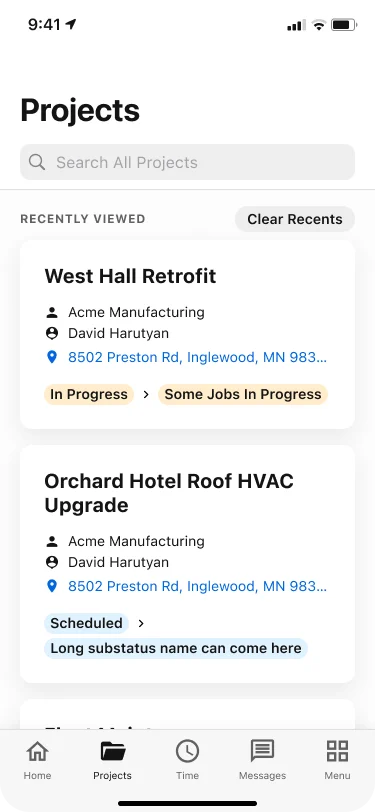
The ServiceTitan Field Mobile App puts full project visibility and control in the hands of field teams. From the job site, users can:
View and search projects to access statuses, descriptions, scheduled jobs, and key project details.
Capture and manage media by viewing, adding, and sharing photos, videos, and attachments.
Complete and submit forms, daily reports and logs, and RFIs directly from the field.
Track and manage labor by clocking in and out, viewing personal timesheets, managing time for other crew members, and adding workers to projects or jobs—even if they weren’t originally assigned.
Collaborate in real time using threaded internal messaging across jobs, projects, and tasks, with the ability to tag teammates or email external stakeholders like insurance adjusters.
Stay aligned on work and revenue by viewing assigned tasks and tracking open opportunities or unsold estimates.
Get a Personalized Demo of ServiceTitan Construction Software
What we’ve covered above is just a sampling of the desktop features that ServiceTitan offers for construction project management.
If you’re interested in learning more about how ServiceTitan’s cloud-based platform can help you manage and grow profitability in your contracting business, schedule a call with us for a live, one-on-one walk-through of the features and functionality we’ve discussed throughout this post.
2. Fieldwire


Fieldwire is a construction management software designed to streamline communication and project coordination on the job site. Built for contractors, project managers, architects and designers, Fieldwire's platform is designed to facilitate most aspects of onsite project management.
Key features include task management, punch list and inspection tools, blueprint viewing and versioning, scheduling and reports, and the ability to annotate and share plans and documents. Fieldwire also offers a mobile app, allowing users to access information, communicate, and view blueprints even when offline.
3. Buildertrend


Buildertrend is a comprehensive construction project management solution built for home builders, remodelers, and specialty contractors. The platform offers a wide array of features including scheduling software and project planning, financial management, customer management, and sales management.
With its customer relationship management (CRM) tools, users can track leads and manage customer interactions. In addition, its customer portal helps contractors streamline customer interactions by allowing clients to make selections, approvals, view project progress, and communicate directly with builders.
4. Procore


Procore is a construction management software solution designed to serve a wide range of customers including civil and infrastructure, general contractors, owners, public agencies, and specialty contractors. Procore offers comprehensive tools for preconstruction, project management, quality and safety, construction financials, and more.
The platform also includes expansive integration capabilities with other software, and provides extensive training resources and customer support, ensuring users can maximize the software's potential.
5. BuildOps


BuildOps is an all-in-one field service software specifically designed for commercial service contractors in industries like plumbing, electrical, HVAC, and facilities management. The software emphasizes streamlining all aspects of business operations, including scheduling, dispatch, inventory management, contract management, and real-time reporting.
The platform's intuitive design and focus on the specific needs of commercial service contractors make it a tailored solution, offering features like real-time communication between field and office staff, and seamless integration with leading accounting platforms.
To learn more about the differences between BuildOps and ServiceTitan, check out our in-depth comparison.
6. Contractor Foreman


Contractor Foreman is another comprehensive construction management software designed primarily for small to mid-sized contractors and construction firms. This platform offers a wide range of features including project scheduling, estimates, time tracking, document and financial management, along with crew management, and more.
Contractor Foreman emphasizes its affordability and user-friendly interface, as well as free training and support.
7. Houzz Pro


Houzz Pro is a specialized business management software tailored for builders, remodelers, architects, designers, and other contractors. This platform offers features such as project management, invoicing, and client communication tools, integrated with powerful marketing features like website building and online visibility tools.
Houzz Pro is integrated with the broader Houzz platform, providing professionals access to a vast community of homeowners and design enthusiasts. This integration enables users to showcase their portfolios, gather reviews, and connect with potential clients.
If you’re interested in learning more about how ServiceTitan’s cloud-based platform can help you manage and grow profitability in your contracting business, schedule a call with us for a live, one-on-one walk-through of the features and functionality we’ve discussed throughout this post.


Interested in Construction Software?


